It can be incredibly frustrating when your UMIN Geek Bar Pulse X, a device known for its advanced display, suddenly seems to have a screen that isn't working. This innovative disposable vape offers a wealth of information at your fingertips, from battery life to e-liquid levels and puff modes. When that visual feedback disappears, it can leave you wondering if your device is faulty or if there's a simple fix. Don't worry, many screen-related issues have straightforward solutions.
Important Compliance Notice: Vaping products are intended for adult smokers and vapers only. You must be of legal smoking age in your jurisdiction to purchase or use these products. Please vape responsibly and adhere to all local regulations regarding vaping. This information is for educational purposes and does not encourage underage use or illegal activities.
What should your UMIN Geek Bar Pulse X screen display?
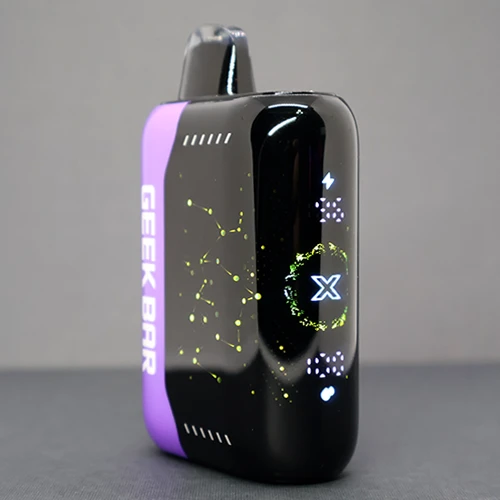
Before diving into troubleshooting, it's helpful to understand what your UMIN Geek Bar Pulse X screen should be showing when it's functioning correctly. This device features a vibrant 3D curved screen designed to provide real-time updates on several key metrics, enhancing your vaping experience. Typically, you'll see:

- Battery Percentage: A clear indicator of your remaining power.
- E-liquid Level: Shows how much vape juice is left, helping you anticipate when it's time for a new device.
- Puff Mode: Indicates whether you're in the standard 'Regular' mode or the more intense 'PULSE' mode.
- Puff Count: Tracks your usage, giving you an idea of how many puffs you've taken.
This information is crucial for managing your vaping sessions and ensuring you get the most out of your device. When the screen goes blank or displays unexpected symbols, it interrupts this flow of information. To explore the full features of this device, you can learn more about UMIN Geek Bar PULSE X 25000 Puffs Disposable Vape.
Common reasons your screen might appear 'not working' 🤔
Often, a screen that seems unresponsive isn't necessarily broken. Several factors can contribute to this perception:
- Low Battery: The most common culprit. If your battery is critically low or completely depleted, the screen might not light up or display anything at all. The device prioritises power for heating the coil, so the screen might be the first thing to go.
- Device in Sleep Mode: Some devices enter a low-power sleep mode after a period of inactivity to conserve battery. A quick puff or a button press (if applicable) usually wakes it up.
- E-liquid Depletion: While the screen usually shows low e-liquid, if it's completely empty, the device might cease to function, and the screen could remain blank as a result.
- Environmental Factors: Extreme temperatures can affect electronic devices. Very cold conditions might cause the screen to become sluggish or temporarily unresponsive. Similarly, overheating could trigger safety shutdowns.
- Minor Software Glitch: Like any electronic gadget, a temporary software hiccup can occur, causing the screen to freeze or go blank.
- Physical Damage: Although the Geek Bar Pulse X is built for durability, accidental drops or impacts could damage the internal connections to the screen.
Step-by-step troubleshooting for your UMIN Geek Bar Pulse X screen
If your screen isn't cooperating, try these steps before assuming the worst:
- Charge Your Device Fully: This is the first and most crucial step. Connect your UMIN Geek Bar Pulse X to a reliable USB-C charging source. Observe if any charging indicator appears on the screen or if the screen lights up during charging. A full charge typically takes around 30-60 minutes for a 700mAh battery. If the screen remains blank even while charging, proceed to the next steps.

- Attempt a Puff: Sometimes, simply taking a draw can reactivate the screen from a sleep state. Ensure the mouthpiece is clear and try a gentle, consistent puff.
- Check for E-liquid Level Indicators (if visible): If the screen briefly flickers or shows a low e-liquid icon before going blank, it might be indicating that the e-liquid is depleted, not that the screen itself is faulty. The UMIN Geek Bar Pulse X comes with 18mL of e-liquid, designed for long-lasting use, but even that eventually runs out.
- Switch Between PULSE and Regular Modes: The UMIN Geek Bar Pulse X allows you to switch between a more intense PULSE mode and a standard Regular mode. While the screen is blank, try the action that normally switches modes (e.g., a specific button press or sequence, if your model has one). Sometimes, this can reset a minor display glitch.

- Allow Device to Return to Room Temperature: If your device has been exposed to extreme cold or heat, bring it indoors and let it normalise to room temperature for 15-30 minutes before trying again.
- Gentle Taps: In rare cases of minor internal connection issues, a very gentle tap on the device's body might temporarily restore the screen. However, this is not a recommended long-term solution and should be done with extreme caution to avoid further damage.
When to consider a replacement
If you've tried all the troubleshooting steps and your UMIN Geek Bar Pulse X screen remains unresponsive, or if the device isn't producing vapour, it's likely that the device has reached the end of its life or has an internal fault. As a disposable vape, these devices are not designed for repair. In such cases, it's time to consider a replacement.
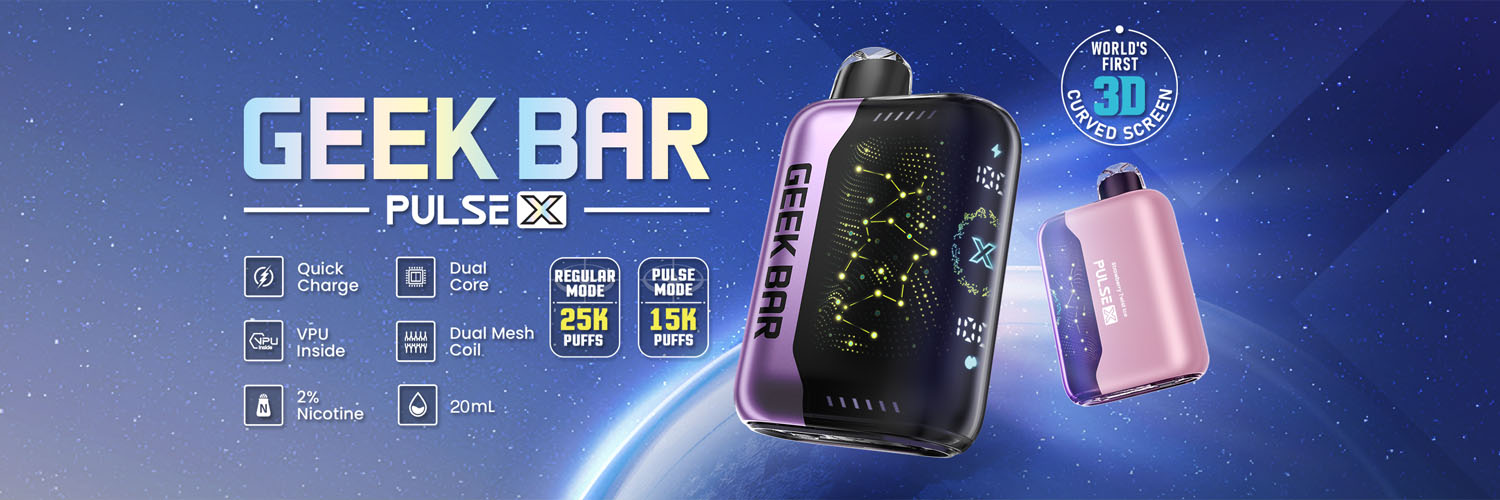
When choosing a new device, you might appreciate the advanced features of the Geek Bar Pulse X, but there are other excellent options available depending on your priorities:
- For long-lasting, hassle-free vaping without a screen: Consider the UMIN Slick Plus 10000 Puffs Disposable Vape or the IGET ONE 12000 Puffs Disposable Vape. These focus on high puff counts and flavour variety.
- For a pod-only system with high puff count: The IGET BAR PLUS S3 Pod Only 10000 Puffs offers flexibility.
- For robust, high-puff disposables: Explore the IGET BAR PRO 10000 Puffs Disposable Vape or the ALIBARBAR INGOT 9000 Puffs Disposable Vape.
While these alternatives may not feature the interactive screen of the Geek Bar Pulse X, they offer reliable performance and a wide range of flavours, catering to different preferences. The UMIN Geek Bar Pulse X's screen is a premium feature, and when it works, it provides valuable insights. However, its absence doesn't mean the end of your vaping journey.
Must-read before buying:
- Age Restriction: You must be 18 years or older (or the legal age in your jurisdiction) to purchase vaping products.
- Purchase Conditions: All sales are subject to our terms and conditions, including age verification processes.
- Privacy Policy: Your personal information is handled in accordance with our strict privacy policy. We do not share your data with third parties without your consent.
- Responsible Use: Vaping products contain nicotine, which is an addictive chemical. If you are not a current smoker or vaper, we advise against starting. Consult a healthcare professional if you have concerns about nicotine use.
- Product Authenticity: Always purchase from authorised retailers to ensure you receive genuine products. Counterfeit products may not meet safety standards.
- Disposal: Dispose of used disposable vapes responsibly at designated electronic waste collection points. Do not litter or dispose of them in general waste.
By understanding your device and following these simple troubleshooting steps, you can often resolve screen issues with your UMIN Geek Bar Pulse X. If not, a world of other reliable vaping options awaits.